Split Ballot Design

Survey Router / Split Ballot Testing

What is Survey Router / Split Ballot Testing?

Split Ballot Testing is when you divide your sample (randomly) into two or more sub-samples and perform an experiment. The experiment could be different versions of a survey, or different surveys, etc. The goal is to see if any differences exist between the versions of the survey or how users behave differently.

How to set up Survey Router / Split Ballot Testing?

Go To:
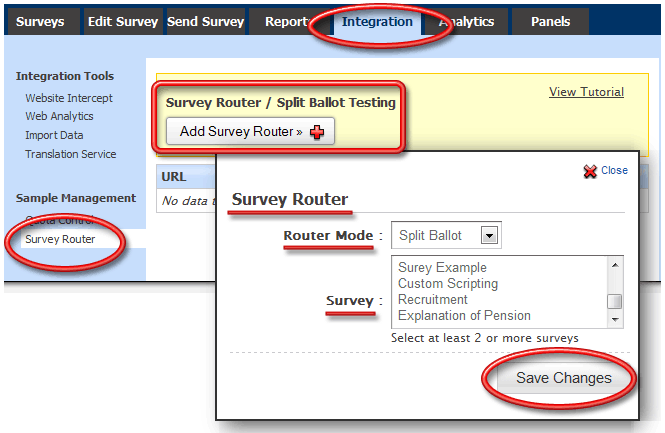
  • Login »  Surveys »  Integration »  Sample Management »  Survey Router
Select the Router Mode and assign surveys and click on the Save Changes button.

1. Screenshot

Survey Software Help Image

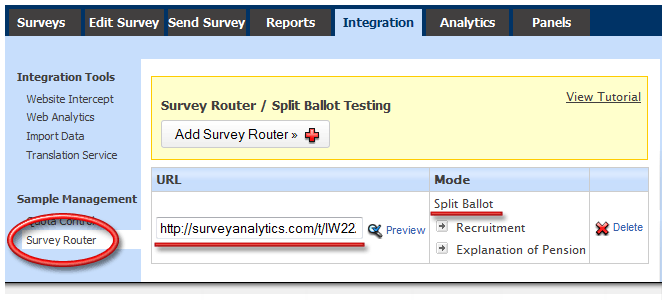
A URL will be provided which can be used for distribution to your panel/respondents. Depending on the mode selected the surveys will be displayed.

2. Screenshot

Survey Software Help Image

What are the different router modes?

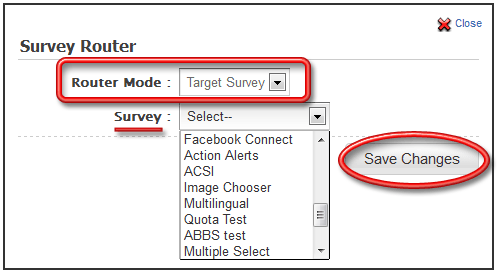
Target Survey: With target survey you can set up a URL and assign a survey for the URL.

3. Screenshot
Survey Software Help Image

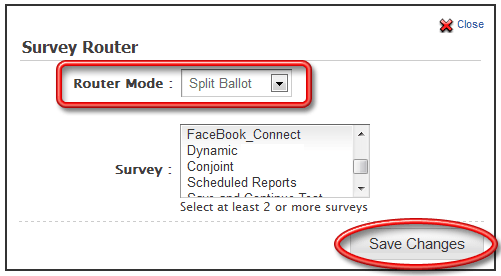
Split Ballot: With split ballot you can set up a URL and assign Multiple Surveys. Randomly one of the selected surveys will be picked.

4. Screenshot

Survey Software Help Image

License Restrictions

This feature/tool [Survey Router / Split Ballot Testing] is not available as part of any of our standard self-service licenses. It is part of our Enterprise Service License. Please contact your Account Manager for pricing and options for purchasing the Enterprise Service License.

Please Visit Survey Analytics to learn more about Enterprise Solutions

PRODUCTS & SERVICES

SurveySwipe mobile survey panel app for smartphones including iOS and Android devices.

SurveyPocket iPad and Android tablet data app for collecting offline and online data in the field.

Visualize Your Data - Interactive Charts and Dashboard for the Tablet - iPad, Android, Kindle...

Get unprecedented vision into consumers' daily lives by collecting moment-to-moment data from their mobile devices.

MediaBunker helps you securely test videos, audio, pictures and more using mobile devices.